
Short Answer
TL;DR — PayPal froze your funds: what this guide covers PayPal freezes accounts to manage risk, and a launch spike looks identical to fraud from the algorithm's side — so indie founders get hit disproportionately. There are three freeze types: a payment hold (clears in up to 21 days), a standard account limitation (a document review, resolved through the Resolution Center), and a permanent limitation, where PayPal can hold your funds for up to 180 days under its User Agreement. The playbook: verify the notice is real, screenshot everything, submit complete documentation within 24 hours, stand up a backup payment processor within 48 hours, and never open a duplicate account. If PayPal goes quiet, escalate on a schedule — written follow-up (day 7), one documented phone call (day 10), CFPB or your national regulator (day 14), demand letter (day 30). Most funds do come back; the real lesson is architectural: any single payment processor is a single point of failure, and your app should talk to a payment layer — not to a provider — so the next freeze is a config change, not a crisis.
In January 2022, a woman named Lena Evans discovered that PayPal had taken $26,984 out of her account. Not frozen it. Taken it. Her account had been limited six months earlier without explanation, she'd waited out the hold like she was told to, and at the end of it, PayPal seized the balance and never told her why. She'd been a customer for 22 years. She ended up as lead plaintiff in a federal class action.
If you're reading this because you just got the email ("Your account access has been limited"), your stomach already knows what mine knew the first time I saw one: this isn't a glitch. Your PayPal balance is locked, your checkout might be dead, and somewhere between you and your own money there is now a form, a queue, and a policy document written by lawyers.
Here's the good news, and it's real: most frozen PayPal accounts get their funds released. The founders who recover fast all do roughly the same five things, and the founders who lose months (or the money itself) all make the same three mistakes. This guide is the whole playbook: what a PayPal freeze actually is, what to do in the first 48 hours, how to escalate when the Resolution Center goes quiet, how to keep revenue flowing while you wait, and how to rebuild so that no payment processor can ever put your business in a chokehold again.
No theory. No panic. Let's go.
The short version: what to do right now
If your PayPal account is frozen, here's the emergency card. Everything below this list is the detail.
- Read the email and the Resolution Center notice carefully. The reason for the limitation determines everything else. Verify the email is genuinely from PayPal (phishing loves this moment).
- Log in and check what you can still do. Some limitations block withdrawals only; others freeze the whole account. Screenshot everything (balances, transaction history, the notice itself) while you still have account access.
- Submit exactly what the Resolution Center asks for, within 24 hours. Invoices, supplier information, proof of address, tracking numbers, photo ID. Complete, legible, boring. Speed and completeness are the two levers you actually control.
- Stand up a backup payment processor today, not after the review. Your review takes as long as it takes. Your revenue doesn't have to wait with it.
- Do NOT open another account. PayPal's duplicate-account detection is aggressive, and a second account linked to the same identity is the fastest way to turn a temporary account limitation into a permanent ban.
That's the skeleton. Now the muscle.
Why PayPal freezes accounts in the first place
A quick mental model helps here, because the freeze feels personal and it almost never is.
PayPal sits in an awkward legal position: it moves money like a bank but isn't quite one, which means regulators hold it responsible for fraud, money laundering, and chargebacks flowing through its pipes. Its answer to that pressure is an automated risk engine that watches every merchant account for anything unusual, and when the engine gets nervous, it doesn't send you a polite question. It pulls the handbrake.
According to PayPal's own documentation on account limitations, the common triggers are:
- Regulatory requirements. Identity verification, anti-money-laundering laws, or missing documentation (nonprofits get hit with this constantly).
- Acceptable Use Policy issues. Activity on the account that PayPal believes violates its use policy: selling prohibited items, or looking like you might be.
- Suspected unauthorized use. If PayPal thinks someone accessed your account without permission, it limits the account to protect the funds while it investigates the suspicious activity.
- Higher-risk activity. This is the one that catches founders: sudden spikes in sales, an unusual number of claims or chargebacks, or starting to sell an entirely new type of product.
- Inactivity. Dormant accounts get limited until ownership is re-verified.
Read that fourth bullet again, because it describes a successful product launch. You ship, you hit the front page of Hacker News or your Product Hunt launch pops, revenue 20x's overnight, and PayPal's risk model sees exactly what a stolen-card fraud ring looks like. A launch spike and a fraud spike are, to an algorithm, the same shape.
This is why the freeze targets indie founders and small merchant accounts so disproportionately. A business doing steady, predictable volume for ten years never trips the wire. A solo builder whose new app just went viral trips it on the best day of their year. Digital goods sellers get it even worse: no tracking numbers, no proof of delivery, instant fulfillment: every signal PayPal uses to verify legitimate physical products is missing by design.
So no, PayPal didn't freeze your account because it hates you. It froze your account because its risk model can't tell the difference between your best week ever and a crime. Understanding that changes how you respond: you're not arguing with a judgment, you're feeding evidence to a checklist.
Understand which freeze you're dealing with
"Frozen" is one word covering three very different situations, and your strategy depends on which one you've got.
The payment hold (annoying, temporary)
PayPal holds funds from specific transactions, usually for new sellers, new business accounts, or accounts with recent disputes. Money typically becomes available within 21 days, faster if you add tracking information or the buyer confirms receipt. This one mostly resolves itself. Provide tracking, deliver well, wait.
The account limitation (the standard freeze)
This is the classic PayPal account limitation: you get a notification from PayPal, some or all functionality is blocked (you may be unable to send money, withdraw, or accept payments) and the Resolution Center lists steps to fix it. This is a review, not a verdict. PayPal is asking for information, and its own removal process is: go to the Resolution Center, complete the requested steps, upload documents, wait for review. PayPal's UK guidance says it aims to respond within about 3 business days of receiving your documents. Most limitations that get resolved get resolved here.
The permanent limitation (the nuclear one)
The email says PayPal can no longer offer you its services, your account is frozen for good, and your balance will be held for up to 180 days. This is the scenario everyone fears, and it's real: the 180 days comes straight out of PayPal's User Agreement, which lets PayPal hold funds after closing an account to cover potential chargebacks and claims that might arrive later.
The theory is defensible: chargebacks can land months after a sale. The practice is brutal: your working capital sits in limbo for half a year, and in the worst documented cases, wasn't returned at all. The Evans v. PayPal class action was built on accounts that were frozen without explanation and then emptied after the hold expired. One plaintiff reported over $172,000 transferred to PayPal itself, justified as damages under the Acceptable Use Policy. The plaintiffs' framing was blunt: a user agreement cannot be a "license to steal."
To be clear about the odds: permanent seizure is the rare tail, not the norm. But the 180-day hold on a permanent limitation is standard, which means the moment you see that email, your planning horizon changes. You are no longer trying to save this account. You are trying to (a) get the funds released on schedule, (b) survive six months without them, and (c) make sure this can never happen to you again. Sections below cover all three.
The first 48 hours: the playbook, hour by hour
Whatever type of freeze you have, the first two days set the trajectory. Here's the sequence.
Hour 0–1: Verify, read, breathe
First, confirm the email is real. Freeze notifications are a favorite phishing template, because panicked people click things. Don't follow links from the email. Log in to PayPal directly (type the URL) and check the Resolution Center or the bell icon on your dashboard. PayPal's own guidance: if the email says you're limited but the Resolution Center shows nothing, the email is fake. Forward it to [email protected] and change your password.
If the limitation is real, read the notice like a lawyer, twice. What exactly is restricted? What is the stated reason for the limitation? What documents are requested? Is there a deadline? The specific wording tells you which of the three freeze types you're in.
Hour 1–3: Document everything while you still can
Account access can shrink during a review. Before it does, capture:
- Screenshots of your balance and the limitation notice
- Your full transaction history (download the account statement CSVs)
- Any open disputes, claims, or chargebacks in the Resolution Center
- Your account information as PayPal has it: legal name, address, linked bank accounts
If you end up escalating to a regulator or a lawsuit later, this snapshot is your evidence. If you don't, you've lost twenty minutes. Cheap insurance.
Hour 3–24: Feed the machine exactly what it asks for
Now the actual work. The Resolution Center will list required steps, typically some combination of:
- Photo ID (passport or driver's license, all corners visible, not expired)
- Proof of address (utility bill or bank statement, recent, name matching the account)
- Business documentation: registration, invoices from your supplier, or for digital goods and SaaS: your terms of service, refund policy, proof of delivery (license keys issued, account activation logs, download receipts)
- Explanations for whatever triggered the review, e.g., "the sales spike on June 12 corresponds to our public launch, here's the Product Hunt page and press coverage"
Two rules make the difference here:
Be complete the first time. Every incomplete submission adds a full round-trip to the queue. Failing to provide a requested document doesn't pause the clock in your favor; it just extends the freeze.
Be boring. The reviewing agent works a checklist. Factual, specific, documented submissions move through it. Emotional appeals, legal threats, and walls of text about how PayPal is destroying your livelihood do not change the checklist. They change which queue you're in, and not the good one.
Hour 24–48: Stand up your backup processor
This is the step most founders delay, and it's the one that separates a bad week from a bad quarter. Your PayPal review will take as long as it takes: three days, three weeks, or 180. Your business operations don't have to be frozen just because your balance is.
Concretely, in the next 24 hours:
- Open (or dust off) an account with a second payment processor: Stripe, Paddle, Lemon Squeezy, a local acquirer, whatever fits your product and country.
- Point your checkout at it. If PayPal is hardcoded into your app in fifteen places, this is going to hurt. More on that in the fireproofing section, because that pain is a choice you made in your architecture, not a law of nature.
- Email affected customers before they email you. Something honest and short: payments are temporarily moving to a new provider, subscriptions and access are unaffected, here's the new checkout. Customers forgive infrastructure problems; they don't forgive silence followed by failed invoices.
One warning for subscription businesses: your PayPal billing agreements don't transfer. Subscribers paying you via frozen PayPal will need to re-subscribe on the new processor. Make that a one-click email campaign, expect to lose a few percent, and treat every recovered subscriber as a win. (And file away the lesson: the true cost of a payments freeze isn't the held balance; it's the recurring revenue that churns while your checkout is dark.)
What NOT to do (the three classic mistakes)
- Don't open a new account. Not under your name, your spouse's name, or a fresh LLC with the same bank account. PayPal links accounts by device, bank, address, and identity, and a duplicate found during a review converts "temporary limitation" into "permanent, with prejudice."
- Don't rage-call. One documented, polite call to PayPal customer service to confirm what's needed: useful. Daily furious calls demanding your money out of PayPal: actively harmful, and each one is logged.
- Don't go public first. A factual public post after you've exhausted the process (day 14+) can help. Torching PayPal on Twitter on day 2, before you've submitted documents, marks you as hostile and gains nothing.
When the Resolution Center goes quiet: the escalation ladder
You submitted everything. Days pass. The status doesn't move. Real cases sit here for weeks. Browse r/PayPal or r/smallbusiness and you'll find long threads of merchants with five figures locked and no answers. Here's the ladder, in order. Each rung is more forceful; don't skip rungs.
Rung 1: Follow up in writing (day 5–7). Message through PayPal's message center referencing your case. Ask three specific questions: is my documentation complete, what remains outstanding, and what is the expected timeline? Written answers create a paper trail; phone answers evaporate.
Rung 2: Call PayPal, once, well (day 7–10). Ask for the account limitations department specifically. Log the date, time, agent name, and what was said. If you're facing a permanent limitation, ask directly whether the closure involves a MATCH list filing (the inter-processor blacklist). This matters enormously for opening your next merchant account elsewhere.
Rung 3: Regulators (day 14+). In the US, file a complaint with the Consumer Financial Protection Bureau. Companies must respond to CFPB complaints, typically within 15 days, and merchants consistently report that a CFPB complaint is what finally got their case in front of a human with authority. In the UK, the equivalent path runs through PayPal's formal complaints process and then the Financial Ombudsman Service; in the EU, your national financial regulator. State regulators matter too: PayPal holds money transmitter licenses that come with obligations.
Rung 4: The demand letter and small claims (day 30+). For serious balances, a lawyer's demand letter citing your state's money transmission laws and the Electronic Fund Transfer Act changes the conversation. Small claims court works for amounts within its limits, and PayPal's user agreement pushes bigger disputes to arbitration, which sounds scary but is often more favorable to individuals than people assume, because PayPal bears most arbitration costs.
Rung 5: Wait out the 180 and verify. If the limitation is permanent, mark your calendar for 180 days after your last transaction. When it passes, PayPal should notify you that the remaining balance (minus any chargebacks that landed during the hold) is available to withdraw to your linked bank. If the date passes and there's silence or a refusal to release funds, you go straight back to rungs 3 and 4, and know that you're in the exact fact pattern that produced the Evans class action.
Through all of this, keep one file: every email, every case number, every call log, every screenshot. The single biggest difference between merchants who get their money back and merchants who don't isn't luck; it's documentation.
Will you actually get the money?
Honest answer: probably yes, eventually, with two big caveats.
For ordinary limitations, providing the requested documents resolves the majority of cases and the funds come back when the limitation lifts. For permanent limitations, the standard outcome is release after the 180-day hold, minus any chargebacks. The money is delayed, not gone.
Caveat one: chargebacks during the hold come out of the held balance. If your freeze triggered customer panic and a wave of disputes, the balance you get back in six months can be meaningfully smaller than the one that was frozen. This is another reason the customer-communication step in hour 24–48 matters so much: calm customers don't file chargebacks.
Caveat two: the seizure cases are real, if rare. PayPal has claimed held balances as liquidated damages for Acceptable Use Policy violations, and that practice is exactly what the Evans lawsuit attacked. If you receive a notice that your balance is being taken as damages rather than held, skip the ladder's lower rungs: that's regulator-and-lawyer territory immediately, and you should treat it with the urgency of the five-figure sum it probably is.
Fireproofing: never let one processor hold your business hostage
Here's the uncomfortable question this whole ordeal should leave you with. It isn't "how do I avoid triggering PayPal's risk model?" You can follow every best practice (accurate descriptions, tracking on everything, fast dispute responses, gradual volume growth, telling PayPal in advance about launches and product changes) and still get flagged, because the model is a black box and your best week looks like fraud.
The real question is: why was one company's risk algorithm able to switch off your revenue in the first place?
Walk through your codebase after a freeze and you'll find the answer. The processor isn't a component of your app; it's load-bearing. Checkout calls its API directly. Webhooks from it drive your billing states. Its customer IDs are foreign keys in your database. Subscription logic assumes its data model. You didn't integrate a payment provider; you fused with one. So when it freezes you, "switch providers" means weeks of engineering during the exact crisis when you have no revenue to fund weeks of engineering.
There's a name for this in every other part of your stack: single point of failure. We put databases behind ORMs, servers behind load balancers, DNS behind failover, and then wire the most existentially important dependency of all, the one that controls whether money reaches us, directly into a hundred call sites.
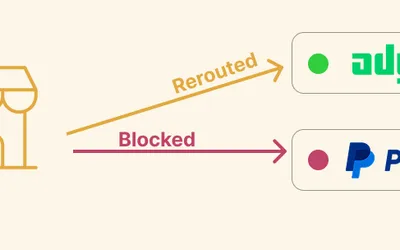
The fix is the same abstraction pattern you already believe in everywhere else: your application should talk to a payment layer, and the payment layer should talk to providers. Checkout, webhooks, refunds, and subscription state go through one interface; PayPal, Stripe, or any other processor becomes a configuration entry behind it. When a provider freezes you, raises fees, or exits your country, you switch the config and re-route, without rewriting code and without losing your customers.
This is the architecture Dough is built around. Dough is a Django boilerplate for builders who ship more than one product, and its payment layer puts 100+ payment providers behind a single checkout interface, so a provider turning on you is a bad afternoon, not an extinction event. The same anti-lock-in philosophy runs through the whole foundation: transactional email that can move across 15+ ESPs, deploy anywhere, and one command to pull upstream updates into your customized codebase. You can absolutely build this abstraction yourself (the pattern above is free and works in any stack), but if you'd rather start from a foundation where the fireproofing is already poured, that's the entire reason Dough exists.
Whichever route you take, do it before the next freeze. The best time to remove a single point of failure is while nothing is on fire.
Your recovery checklist
The whole playbook on one card:
- Verify the limitation is real (log in directly; beware phishing)
- Read the notice: which freeze type, what's restricted, what's requested
- Screenshot balances, statements, and notices while you have access
- Submit complete, boring, factual documentation within 24 hours
- Launch a backup processor within 48 hours; email customers proactively
- Never open a duplicate account
- Escalate on a schedule: written follow-up (day 7), one good phone call (day 10), CFPB or your national regulator (day 14), demand letter (day 30)
- Calendar the 180-day date if the limitation is permanent, and enforce it
- Rebuild behind a payment abstraction so this is the last time you read a guide like this in a panic
When the fire is out
A frozen PayPal account feels like a catastrophe, and in the moment it is one. But talk to founders a year after their freeze and they almost all say a version of the same thing: the freeze cost them a month; the architecture that made the freeze catastrophic had been costing them all along; they just hadn't been billed yet.
So work the playbook, get your funds released, and then spend one honest afternoon on the question that matters: which other provider in your stack could do this to you tomorrow? If Stripe is the other half of your payment setup, read our companion guide on what to do in the first 48 hours after a Stripe account suspension: same playbook energy, Stripe-specific mechanics, and the two guides together cover the vast majority of indie payment emergencies.
And if you're done treating your payment infrastructure as a thing that happens to you: Dough was built by founders who got burned so that yours can't be. One foundation, 100+ payment providers behind one interface, and no company ever again standing between you and your own revenue.
FAQ: PayPal freezes, holds, and limitations
PayPal limits accounts to manage risk and meet regulatory obligations. The usual triggers: suspected fraudulent activity, a spike in sales or disputes, missing verification documents, or a suspected security breach. When your account is frozen or limited, some features become temporarily unavailable (withdrawals, payments, or both) while PayPal reviews. A "PayPal account frozen" notice is almost always the start of a review, not a verdict.
It depends on the freeze type. Standard payment holds clear in up to 21 days. Document reviews usually get a response within about 3 business days of a complete submission. After a permanent limitation, PayPal may hold your funds for up to 180 days to cover potential chargebacks. And yes, that means your balance can sit frozen for 180 days even when no disputes exist. PayPal can legally hold the money that long under its User Agreement, which is exactly why the backup-processor step in this guide isn't optional.
Work the ladder in order: complete every Resolution Center step, then follow up in writing, then call, then file with the CFPB or your national regulator. Once the limitation lifts (or the 180-day hold expires), the balance in your PayPal account becomes withdrawable to your linked bank. The fastest way to get your money back is complete documentation on day one; the strongest way, if PayPal stalls, is a regulator complaint with your paper trail attached.
Yes. A PayPal limitation is not automatically final: you can appeal by submitting new information to PayPal through the Resolution Center or the message center, and by asking in writing for the specific policy provision you allegedly violated. If that stalls, the ways to challenge PayPal escalate outward: regulator complaints (CFPB in the US, Financial Ombudsman in the UK), a demand letter, then small claims or arbitration for serious amounts.
It can. In severe cases (repeated policy violations, prohibited products, or unresolved risk concerns), PayPal may end the relationship permanently and close the account for good. When that happens, account holds convert into the 180-day timeline described above: the account never comes back, but the funds normally should. Calendar the date and enforce it.
If a Pay Pal account had been frozen long ago (many of these date back to the PayPal or eBay era, when the two were joined at the hip), the held funds should have been released after 180 days. If they weren't, contact support with whatever records you have, then file a regulator complaint. Be realistic about scope: getting your account back after a permanent limitation almost never happens; focus the fight on getting the balance back instead.
Millions of people use PayPal for online transactions every day without incident, and as a checkout option it converts well; some customers simply won't buy without it. The risk isn't PayPal specifically; it's letting any single company control all of your revenue. Two rules make using PayPal safe for a business: sweep PayPal money to your bank on a fixed schedule so the exposed balance stays small, and never let PayPal be your only rail.
All of them. Holds, reserves, and account freezes are standard business practice across payment processors: Stripe, Square, and every acquiring bank behind them work from the same risk playbook, because they carry the same chargeback liability. Stripe's version of this emergency has its own mechanics, which is why we wrote a separate Stripe suspension survival guide. The lesson isn't "find the processor that never freezes" (it doesn't exist); it's "architect so a freeze at any one of them can't stop you."
Log in and check: limitations vary. Sometimes receiving payments works but withdrawals don't; sometimes everything is locked. While your account is limited you can always use the Resolution Center, download statements, and message support. Do all three. Everything else in your business should already be moving to your backup rail.
Sources
PayPal account limitations: What are they and how to avoid them.
PayPal Editorial Staff. _PayPal account limitations: What are they and how to avoid them._ PayPal Business Resource Centre. https://www.paypal.com/uk/brc/article/understanding-account-limitations
How do I remove a limitation from my account?
PayPal Help Center. _How do I remove a limitation from my account?_ https://www.paypal.com/us/cshelp/article/how-do-i-remove-a-limitation-from-my-account-help535
Legal Agreements / User Agreement.
PayPal. _Legal Agreements / User Agreement._ https://www.paypal.com/uk/legalhub/paypal/home
Evans et al. v. PayPal, Inc.
_Evans et al. v. PayPal, Inc._, Case No. 5:22-cv-00248, N.D. Cal. (filed Jan. 13, 2022). Class action complaint. https://www.classaction.org/media/evans-et-al-v-paypal-inc.pdf
PayPal faces lawsuit for freezing customer accounts and funds.
Engadget. _PayPal faces lawsuit for freezing customer accounts and funds._ January 2022. https://www.engadget.com/paypal-lawsuit-freezing-customer-accounts-funds-073128563.html
Submit a complaint.
Consumer Financial Protection Bureau. _Submit a complaint._ https://www.consumerfinance.gov/complaint/
PayPal permanently froze my account for no reason.
r/PayPal. _PayPal permanently froze my account for no reason._ https://www.reddit.com/r/paypal/comments/rhju3o/paypal_permanently_froze_my_account_for_no_reason/
PayPal froze over $15,000 of our business funds.
r/smallbusiness. _PayPal froze over $15,000 of our business funds._ https://www.reddit.com/r/smallbusiness/comments/1kq14uk/paypal_froze_over_15000_of_our_business_funds_has/
References & Sources
-
PayPal account limitations: What are they and how to avoid them.
• PayPal Business Resource Centre •
https://www.paypal.com/uk/brc/article/understanding-account-limitations -
How do I remove a limitation from my account?
• — •
https://www.paypal.com/us/cshelp/article/how-do-i-remove-a-limitation-from-my-account-help535 -
Legal Agreements / User Agreement.
• — •
https://www.paypal.com/uk/legalhub/paypal/home -
Evans et al. v. PayPal, Inc.
• N.D. Cal. •
https://www.classaction.org/media/evans-et-al-v-paypal-inc.pdf -
PayPal faces lawsuit for freezing customer accounts and funds.
• Engadget •
https://www.engadget.com/paypal-lawsuit-freezing-customer-accounts-funds-073128563.html -
Submit a complaint.
• Consumer Financial Protection Bureau •
https://www.consumerfinance.gov/complaint/ -
PayPal permanently froze my account for no reason.
• Reddit •
https://www.reddit.com/r/paypal/comments/rhju3o/paypal_permanently_froze_my_account_for_no_reason/ -
PayPal froze over $15,000 of our business funds.
• Reddit •
https://www.reddit.com/r/smallbusiness/comments/1kq14uk/paypal_froze_over_15000_of_our_business_funds_has/